
Mastering Sales Commission Management: A Complete Guide
TL;DR
Sales commission management is the process of planning, calculating, tracking, and paying variable compensation for sales teams.
In 2026, companies move away from Excel because errors increase with scale (5-10% payout inaccuracies are common). Moreover, sales teams demand transparency and real-time insights. If not, they are creating their own spreadsheets which keeps them from selling for 2-3 hours per month. The hardest part in all of this have probably finance teams as they spend 30-50 hours/month debugging formulas. And then there’s the compliance side of things. Documentation and auditability now matter more than ever, especially in the EU.Modern sales commission management platforms (like Centify) automate calculations, ensure accuracy, and give reps and finance teams full visibility.
If your commissions rely on spreadsheets or manual rules, you’re already losing time, trust, and revenue.
1. What Is Sales Commission Management?
Sales commission management is the structured method of designing, administering, and optimizing how variable pay is earned and distributed. It includes six topics which I will explain now in more detail.
First up is the compensation planning which entails defining roles, quotas, accelerators, rules.
Then there’s data ingestion which determines the relevant data points such as opportunity data, bookings, ARR, churn. The core of sales commission management of course the commission calculation which means applying logic consistently at scale. Now you probably understand why spreadsheets can only help so far. Nobody wants to be kept in the dark when it comes to compensation that’s why CFOs, sales leaders & RevOps ideally have a focus on communication & transparency. Modern sales commission management softwares bring dashboards, statements and dispute handling to the table, ideally no-code, so there’s no dependency from any vendor. One part that is critical for any earning to be paid out is when payout operations come in. I am talking about approvals, payroll handoff and audit trails. Of course sales commission management doesn’t stop here, on the contrary. If you have mastered the groundwork you can take care of improvements. Therefore, it shouldn’t come as a surprise that the ongoing optimization is part of any commission driven sales org, covering performance analytics and scenario modelling.
Next up, we will talk about the process of sales commission management.
2. The Sales Commission Management Process
Sales commission management breaks into three macro phases.
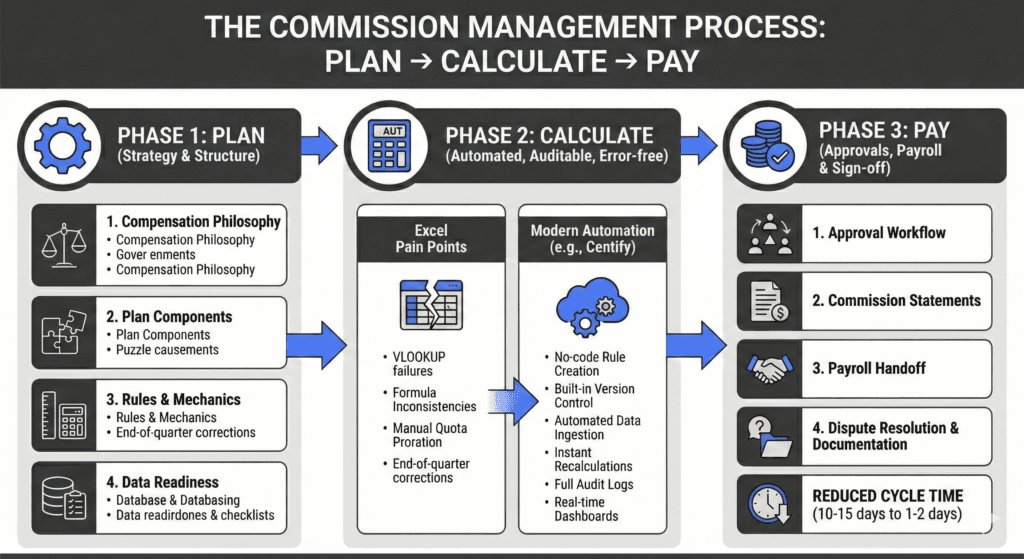
Phase 1: Plan – Strategy & Structure
This is where leadership, RevOps, and finance align on:
1. Compensation philosophy
The compensation philosophy defines the principles that guide how variable pay is designed and delivered. It ensures clear pay-for-performance alignment so employees understand how their individual contributions impact their earnings. The philosophy balances fairness and competitiveness, aligning compensation with EU market norms while remaining financially sustainable within defined budget constraints. This alignment ensures consistency, transparency, and the ability to attract, motivate, and retain high-performing talent.
2. Plan Components
Plan components define the structural elements of each role’s compensation package. This includes setting the on-target earnings (OTE), determining the base-to-variable pay mix (for example, 60/40), and assigning quotas that reflect territory opportunity and business potential. Plans are also tailored to specific roles, such as Account Executives, SDRs, Account Managers, Customer Success Managers, and partner sales roles, ensuring that incentives align with each role’s responsibilities and expected impact.
3. Rules & mechanics
Rules and mechanics establish how commissions are earned and calculated. This includes defining commission rates, performance tiers, and accelerators that reward over-achievement. It may also include caps where appropriate, as well as SPIFs and temporary incentives designed to drive specific short-term business priorities. Clear and documented rules ensure transparency, consistency, and trust in the compensation process.
4. Data readiness
Data readiness ensures that all required operational and financial data is accurate, complete, and usable for commission calculation. This includes maintaining strong CRM data hygiene, ensuring accurate close dates, clearly defining booking versus billing recognition, and supporting multi-currency environments. Proper EU-specific documentation and compliance standards must also be met to ensure auditability, regulatory alignment, and reliable downstream commission processing.
Phase 2: Calculate – Automated, Auditable, Error-free
This is where EU companies struggle most when using Excel:
Common pain points
Sales commission management processes often face operational and technical challenges, especially when spreadsheets are heavily relied upon. VLOOKUP failures and broken references can lead to incorrect calculations and loss of trust in the data. Formula inconsistencies across files or regions create misalignment and increase the risk of errors. Manual quota proration, particularly for mid-period hires or territory changes, introduces additional complexity and increases administrative effort. Handling multi-product commission logic adds further difficulty, as different products may have distinct rates, rules, or eligibility criteria. These issues often culminate in end-of-quarter correction cycles, where teams must urgently identify and fix discrepancies, creating stress, delays, and reduced confidence in the commission process.
What modern automation solves
Modern sales commission automation platforms such as Centify address many of the operational and reliability challenges associated with manual sales commission management. No-code rule creation allows RevOps and finance teams to define and update commission structures without relying on spreadsheets or engineering support. Built-in version control ensures that compensation plans are tracked over time, enabling clear visibility into plan changes and preserving historical accuracy. Automated data ingestion from systems like HubSpot, Salesforce, and Zoho eliminates manual data handling and reduces the risk of errors. Instant recalculations ensure that any updates to deals, quotas, or rules are immediately reflected in commission outcomes. Full audit logs provide transparency and traceability for every calculation and change, supporting compliance and internal governance. Real-time dashboards give both sales representatives and managers immediate visibility into performance and earnings, improving motivation, trust, and operational efficiency.
Phase 3: Pay – Approvals, Payroll & Sign-off
A correct calculation doesn’t matter if payouts lack transparency.
The final phase of sales commission management ensures that calculated commissions are properly approved, communicated, and paid. Even the most accurate calculations lose value if payouts lack transparency, traceability, and formal validation. This phase creates trust by ensuring that all stakeholders understand, review, and formally approve commission outcomes before payment is processed.
Key steps in this phase begin with a structured approval workflow, typically involving RevOps, finance, and direct managers, to validate calculation accuracy and alignment with compensation plans. Commission statements are then generated and shared with employees, including detailed drill-downs that show exactly how earnings were calculated. Once approved, commission data is handed off to payroll for processing and payment alongside regular salary cycles. A clear dispute resolution process must also be in place to handle questions or corrections efficiently and transparently. Finally, proper documentation is maintained to support audit requirements and compliance standards, which is particularly important in regulated environments such as the DACH region.
Modern commission software significantly improves efficiency and reliability in this phase by reducing manual effort, increasing transparency, and accelerating approval workflows. As a result, payout cycles that traditionally take 10-15 days can often be reduced to just 1-2 days, improving operational efficiency and strengthening employee trust in the compensation process.
3. Commission Structures Explained
Commission structures define how sales performance translates into earnings and play a critical role in shaping sales behavior. Different structures are used depending on the company’s business model, sales cycle complexity, and strategic priorities. Common models include flat commissions, tiered commissions, accelerators, draws, multi-product incentives, and recurring revenue structures, each designed to incentivize specific outcomes and align sales efforts with company growth objectives.
1. Flat Commission
Flat commission provides a fixed percentage for each sale, regardless of total performance against quota. This structure is most effective in simple sales environments with short cycles and high transaction volume, such as SDR appointment-setting or transactional sales roles. Its primary advantage is simplicity and transparency, making earnings easy to understand and calculate. However, it offers limited motivation for overperformance, as there is no incremental reward for exceeding targets.
2. Tiered Commission
Tiered commission increases the commission rate as sales representatives surpass defined performance thresholds relative to their quota. For example, a rep might earn 5% up to 80% of quota, 8% from 80-100%, 10% from 100-120%, and 12% beyond 120%. This structure strongly incentivizes overperformance by rewarding higher achievement with progressively better rates. However, managing tiered logic manually in spreadsheets can become complex and error-prone, especially at scale.
3. Accelerators
Accelerators increase commission rates more aggressively once key performance milestones are reached, often using multipliers such as 1.0x, 1.2x, or 1.5x. This model is particularly common in SaaS organizations where exceeding quota significantly contributes to company growth. Accelerators are highly effective at motivating top performers and driving exceptional results. Without automated systems, however, accelerator calculations can become difficult to track accurately and consistently.
4. Decelerators / Ramp Discounts
Decelerators or ramp discounts are used to reduce commission rates during specific periods or under certain conditions. They are commonly applied during onboarding ramp periods or to protect against low-quality pipeline conversions. This ensures that commission payouts remain aligned with sustainable and high-quality revenue generation while supporting new hires as they build their pipeline.
5. Draws (Recoverable or Non-recoverable)
Draws provide guaranteed income to sales representatives during slow periods, ramp phases, or uncertain sales cycles. Recoverable draws are offset against future commission earnings, while non-recoverable draws are guaranteed payments regardless of performance. Draws help provide income stability and reduce risk for sales representatives, but managing draw balances and recovery accurately can be difficult without structured systems, often leading to errors in manual models.
6. Multi-product & Multi-metric Plans
Multi-product and multi-metric plans are common in growing companies with expanding product portfolios. These plans reward performance across multiple dimensions, such as allocating 80% of commission based on annual recurring revenue and 20% based on product upsells, or providing additional bonuses for multi-year contracts. This structure aligns incentives with broader company goals but introduces significant calculation complexity that benefits from automation.
7. Recurring Revenue Plans (SaaS Standard)
Recurring revenue commission structures are the standard model in SaaS businesses, where revenue is generated over time rather than as one-time transactions. These plans typically include separate incentives for acquiring new customers (logo commission), expanding existing accounts (expansion commission), and retaining customers (renewal commission), as well as penalties for churn. They may also differentiate between total contract value (TCV) and annual recurring revenue (ARR), and include clawback provisions if revenue is lost. These structures ensure that incentives align with long-term, sustainable revenue growth rather than short-term sales alone.
4. When to Make the Switch to Commission Software
If any of these statements are true, automation is overdue.
- Your plans change more than once per year.
Every rule change multiplies Excel error risk. - Reps dispute payouts every month.
Disputes = lack of transparency. - Finance spends >10 hours per month on commission admin.
Many spend 40+. - You can’t easily explain how a payout was calculated.
Audit risk, especially in the EU. - You have multiple products, currencies, or quotas.
- You need approval flows.
- Your company is scaling headcount.
Excel scales linearly; software scales infinitely.
Key Requirements for European Companies
When managing sales commissions, European businesses have specific operational, regulatory, and structural needs that must be addressed. A primary requirement is a GDPR-compliant infrastructure that ensures sensitive employee and compensation data is handled in accordance with strict European data protection standards. Utilizing EU-based servers and ensuring complete data residency allows companies to maintain full control over where their data is stored and processed—a critical factor for organizations operating in highly regulated markets like Germany and the broader DACH region.
Beyond data security, modern platforms should offer a no-code environment. This allows RevOps, finance, and operations teams to design, manage, and update commission plans independently, reducing operational complexity without relying on technical resources. Additionally, for companies utilizing SaaS and recurring revenue models, the software needs to support complex compensation structures. This includes the ability to easily calculate ARR-based commissions, renewals, expansions, and clawbacks to align with broader business goals.
5. Best Practices
We put together 10 actionable tips for sales commission management that you can use right now.
- Keep plans simple enough that a rep can explain them in 30 seconds.
Simplicity = adoption. - Publish a written compensation philosophy.
- Standardise definitions (ARR, TCV, churn, new revenue).
- Separate new business from expansion compensation.
- Use automation to enforce rules consistently.
- Run quarterly modelling (“What if quota increases by 20%?”).
- Create role-based dashboards.
Reps see deals; managers see team rollups. - Localise compensation documentation for DACH.
- Build approval workflows.
- Review compensation plans annually with data, not anecdotes.
6. Common Mistakes
❌ Overly complex formulas
If your plan requires nested IF statements, reps will disengage.
❌ Misaligned incentives
E.g., paying equally for low-margin and high-margin deals.
❌ Using spreadsheets beyond scale
Excel becomes un-auditable past 10–20 reps.
❌ Not documenting exceptions
Spiffs, reversals, clawbacks need logs.
❌ Changing goals without explanation
Damages trust irreversibly.
❌ No real-time visibility
Reps should see progress instantly.
7. FAQ – 10 Most Common Questions About Sales Commission Management
1. What is sales commission management in simple terms?
It’s how companies plan, calculate, and pay the variable part of sales compensation.
2. Who typically owns sales commission management?
RevOps + Finance + Sales Leadership jointly.
3. What systems feed commission calculations?
CRM (Salesforce, HubSpot), billing, ERP, HRIS.
4. How often should compensation plans be updated?
Annually, with mid-year adjustments only when necessary.
5. What is the biggest risk of doing commissions in Excel?
Hidden errors and lack of auditability.
6. What does “GDPR-compliant sales commission management” mean?
EU data stays in EU servers, full deletion rights, audit logs, DPA in place.
7. How long should it take to implement commission software?
Centify: typically 2–4 weeks due to no-code setup.
US competitors often require 2–3 months.
8. Should I use quota relief for parental leave or territory changes?
Yes – fairness and compliance require it.
9. How do accelerators work?
They increase commission rates as performance surpasses targets.
10. What is the ROI of commission automation?
Lower admin cost, reduced errors, higher rep performance → typically 5–10× ROI.
Put your sales commissions on autopilot
Ditch the spreadsheets. Automate complex commission structures, ensure GDPR compliance, and motivate your sales team with real-time payout transparency.