
Commission Automation: The Complete Guide [2026]
TLDR
The Problem with Spreadsheets: Up to 90% of companies still use Excel, leading to a 5% error rate and massive time drains. Automation reduces processing time by 80–90% and virtually eliminates manual calculation errors.
The Strategic Shift: Beyond just “paying people,” automation provides real-time visibility for sales reps, which significantly boosts motivation and quota attainment. It also allows Finance teams to forecast liabilities accurately rather than guessing at month-end.
The Operational Workflow: Modern systems create a seamless “data pipeline” by syncing daily with CRMs (Salesforce/HubSpot) and billing platforms (Stripe/Chargebee).
Compliance & Audit Readiness: Automated platforms provide a complete audit trail (who changed what and when), which is vital for GDPR compliance in Europe and for companies preparing for an IPO or external financial audits.
Implementation & Scalability: With no-code platforms like Centify, teams can move off Excel in 1–3 weeks. These systems are designed to scale with complex SaaS models, including recurring revenue, accelerators, and partner splits.
1. The Problem & Definition
What is Commission Automation?
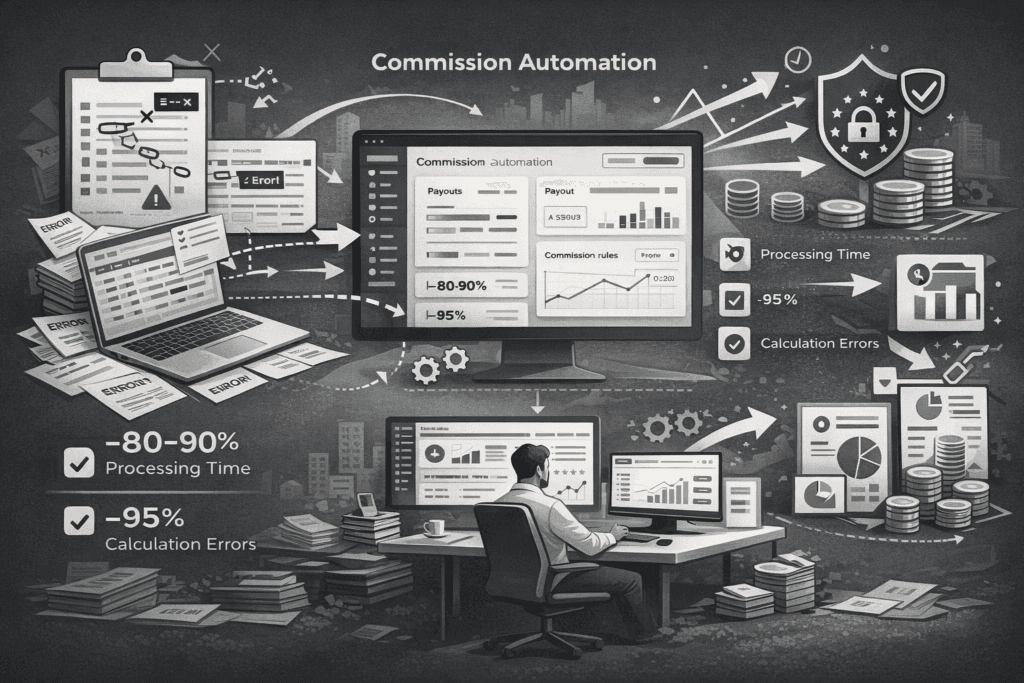
Commission automation replaces manual, spreadsheet-based commission calculations with automated systems that import sales and billing data, apply predefined rules, calculate payouts, and maintain a complete audit trail without requiring manual intervention. Today, an estimated 70-90% of companies still manage commissions in Excel, which creates significant risks such as calculation errors, delays, lack of transparency, and compliance gaps. By adopting automated commission management software, organizations can reduce processing time by up to 80-90% and decrease calculation errors by as much as 95%. Modern platforms, particularly no-code solutions like Centify, make it possible for operations and finance teams to automate commission processes without relying on engineering, while also ensuring GDPR compliance and structured governance.
Why It’s Time to Ditch the Spreadsheet
The importance of commission automation lies in its ability to eliminate spreadsheet fragility and operational inefficiencies. Manual Excel workflows are prone to broken formulas, version conflicts, and limited auditability. These issues often result in disputes between sales and finance teams, reduced trust in compensation accuracy, and significant administrative overhead. In addition, manual commission accounting makes it difficult to forecast operational expenses accurately, since finance teams cannot easily predict commission liabilities. Automated systems address these challenges by creating a single, reliable source of truth for commission calculations, improving transparency, auditability, and financial planning.
Measurable Operational Benefits
Automation also delivers measurable operational benefits. Instead of manually importing CSV files, checking formulas, and calculating commissions at the end of each month, automated platforms sync data daily from CRM, billing, and accounting systems. They calculate commissions automatically based on predefined rules, provide real-time dashboards for sales representatives, and maintain detailed logs of every calculation and adjustment. This reduces administrative workload dramatically, improves payout accuracy, and allows finance leaders to forecast commission expenses more reliably.
2. The Strategic Value of Automation
Driving Company Growth & Scalability
Commission automation is not just an operational improvement; it is a strategic enabler of scalable growth. As companies increase headcount, expand into new markets, and introduce more complex pricing models, manual commission processes become a bottleneck. Commission automation ensures that compensation structures can scale without increasing administrative workload. This allows organizations to grow their sales teams faster while maintaining accuracy, consistency, and financial control.
It also enables leadership to design more sophisticated incentive plans that drive desired behaviors, such as multi-year contracts, upsells, or expansion revenue, without worrying about operational complexity.
Boosting Sales Performance and Motivation
Commission automation directly impacts sales performance by increasing transparency and trust. When sales representatives can see their commissions in real time, they better understand how their actions affect their earnings. This creates stronger motivation, clearer performance feedback, and improved alignment with company goals.
Instead of waiting until the end of the month or quarter, sales teams can track progress continuously. This visibility encourages proactive behavior, increases quota attainment, and improves overall sales productivity.
Elevating RevOps Maturity
Commission automation is a key milestone in RevOps maturity. Early-stage companies often rely on spreadsheets, while more mature organizations adopt integrated systems that connect CRM, billing, and finance.
As RevOps evolves, commission automation becomes essential for creating a reliable revenue infrastructure. It ensures that compensation, revenue reporting, and financial planning are aligned. This improves operational efficiency and allows RevOps teams to focus on optimizing revenue performance rather than maintaining spreadsheets.
Improving Financial Planning & Forecasting
Commission automation improves financial forecasting by providing real-time visibility into commission liabilities. Finance teams can see exactly how much commission has been earned, accrued, and expected at any given point in time. This level of accuracy allows organizations to plan their cash flow more effectively, ensuring that sufficient funds are available for commission payouts without creating unexpected financial pressure.
It also improves operational expense forecasting because commission costs can be tracked continuously instead of being estimated at the end of a reporting period. This allows finance leaders to understand the true cost of sales as the business evolves. Budgeting accuracy also improves significantly, as commission automation eliminates guesswork and replaces it with precise, data-driven projections. This enables more reliable financial planning and better alignment between revenue performance and compensation expenses.
In addition, commission automation strengthens investor reporting by providing clear, verifiable data on commission liabilities and sales performance. Investors and stakeholders gain greater confidence in the company’s financial reporting because commission expenses are transparent, traceable, and accurately calculated. Without commission automation, these figures are often estimated manually using spreadsheets, which increases financial uncertainty, introduces risk, and makes it more difficult to maintain accurate and predictable financial forecasts.
3. How the Process Works
Step-by-Step Commission Workflow
The process of automating commission accounting typically follows several structured steps. The first step is connecting data sources such as CRM platforms like Salesforce or HubSpot, billing systems such as Stripe or Chargebee, and accounting platforms like NetSuite or SAP. These integrations ensure that sales, revenue, and customer data flow automatically into the commission system without manual imports. The second step involves modeling commission rules, which may include revenue-based commissions, recurring revenue logic, accelerators, splits, or quota-based incentives. Modern systems use no-code rule builders instead of spreadsheet formulas, making commission plans easier to maintain and update.
Validation & Calculation
Once rules are configured, historical data can be imported for simulation and backtesting. This allows finance teams to validate that the system produces accurate results and to identify edge cases such as refunds, discounts, or churn scenarios. After validation, the system automates commission calculations continuously, computing payouts at the deal, individual, and team levels. Approval workflows can then be added to ensure compliance, including role-based access controls, review processes, and audit logs. Finally, automated platforms generate payroll exports, dashboards, and financial forecasts, ensuring accurate and transparent payouts.
4. Compliance & Audit Readiness
Ensuring GDPR Compliance and Auditability
Compared to Excel, automated commission management systems offer significant advantages in scalability, transparency, and compliance. Spreadsheet-based systems carry high error risk, lack audit trails, and do not scale effectively as organizations grow. Automated platforms provide real-time visibility, full auditability, and structured governance, while also supporting regulatory requirements such as GDPR compliance and secure data hosting. This makes them particularly valuable for companies operating in regulated environments or managing complex compensation plans.
The Role of Automation in Audits
Commission automation is critical for audit readiness because it creates a structured and transparent record of every commission calculation, approval, and payout. Automated systems maintain complete audit trails that show exactly how commissions were determined, which rules were applied, and when approvals occurred. This ensures that organizations can clearly demonstrate the accuracy and integrity of their compensation processes at any time.
This level of traceability is especially important for GDPR compliance in Europe, where companies must ensure that sensitive employee and compensation data is handled securely and transparently. Commission automation platforms help organizations meet these requirements by maintaining secure, controlled access to data and detailed records of all system activity. It is also essential for financial audits, as auditors need reliable and verifiable documentation to confirm that commission expenses are calculated correctly and reported accurately.
In addition, commission automation strengthens internal governance by ensuring that compensation processes follow defined rules and approval workflows. This reduces the risk of unauthorized changes, inconsistencies, or undocumented adjustments. It also plays a key role in IPO readiness, where companies must demonstrate mature financial controls, transparency, and operational reliability. Automated commission systems provide the documentation and auditability required to meet these standards.
As a result, auditors can verify commission calculations quickly and confidently without relying on fragile spreadsheets or manual records. This reduces audit preparation time, lowers compliance risk, and ensures that the organization maintains a reliable and audit-ready financial infrastructure.
5. The Solution & Implementation
The Centify Advantage: GDPR-Native and No-Code
Centify is especially well suited for European companies and SaaS organizations due to its GDPR-native infrastructure, EU-based hosting, and no-code commission logic. This allows RevOps and finance teams to design and manage commission plans without engineering support while maintaining strict compliance standards. In addition, consulting and implementation support help organizations migrate from Excel quickly and safely, ensuring accurate configuration and faster time to value. The platform is designed specifically to support modern SaaS compensation models, including recurring revenue commissions, accelerators, partner incentives, and quota tracking.
Solving Complexity: When to Move Off Excel
Companies typically see the strongest return on investment from commission automation when they manage multiple data sources, experience frequent Excel errors, operate with complex commission structures, or have growing sales teams. Automation is also highly beneficial for organizations that require auditability, compliance controls, and better alignment between sales and finance. When these conditions are present, automated commission management can significantly reduce operational workload, improve accuracy, and strengthen trust across teams.
Implementation Timeline
Commission automation can usually be implemented within one to three weeks using modern no-code platforms, with most of the effort focused on validating data and configuring commission rules. Once implemented, finance and operations teams can manage commission logic independently, while sales representatives gain real-time visibility into their earnings. Automated integrations with CRM and billing systems ensure continuous accuracy, while payroll exports simplify compensation processing.
6. Conclusion
Overall, commission automation transforms commission management from a manual, error-prone administrative task into a scalable, reliable, and transparent process. By replacing spreadsheets with automated systems, companies improve operational efficiency, ensure compliance, reduce disputes, and create a more transparent and scalable compensation framework that supports long-term growth.
7. FAQ
1. How long does commission automation take?
Typically 1–3 weeks with no-code software.
2. Do we need to migrate historic data?
Yes — for backtesting and forecast accuracy.
3. Does IT need to be involved?
Only for initial integrations; Finance/Ops own everything afterward.
4. Can Salesforce/HubSpot sync automatically?
Yes, via native API connections.
5. Can the system handle clawbacks or refunds?
Yes — rules can include negative adjustments and net revenue logic.
6. Do reps get real-time dashboards?
Yes, with individual breakdowns.
7. How is payroll handled?
Automated exports + audit logs.
8. What industries benefit most?
SaaS, B2B services, agencies, partner-led sales, scaleups.
9. What about partner or channel commissions?
Fully supported, including splits and multi-party deals.
10. Is automation compliant with audits?
Yes — complete audit trails, reproducible logic, change logs.
Put your sales commissions on autopilot
Ditch the spreadsheets. Automate complex commission structures, ensure GDPR compliance, and motivate your sales team with real-time payout transparency.